| |
Site: Home Daily Weather Summaries Search Feedback About |
| Weather: Forecasts Current Recent & climate Severe Know-how Mobile |
Other archives: 2004 | 2005 | 2006 | 2007 11 September: Monthly Weather Reviews now online. The Bureau of Meteorology's long-running Monthly Weather Review series for each state and the Northern Territory, has gone online from today with the issue of the July 2008 editions. Each MWR comes in a pdf file of about 7mb, and gives a comprehensive description of the month's weather, daily charts of the synoptic situation, rainfall and temperatures, and discussions and charts of monthly temperature and rainfall. At the back of each Review are detailed climatological summaries for the capital city, and very detailed tables of daily and monthly temperatures and rainfall for all weather stations, and many rainfall stations, in the state. The access page is http://www.bom.gov.au/climate/mwr/. 10 September: Monthly rainfall data for all years of record now online from the Bureau. The Bureau of Meteorology website now allows you to download all monthly rainfall totals for any of the ~19,000 rainfall stations that it has managed over the past 170 years. This is the first stage of making much of its huge archive of weather data freely available online. Go to http://www.bom.gov.au/climate/data/weather-data.shtml
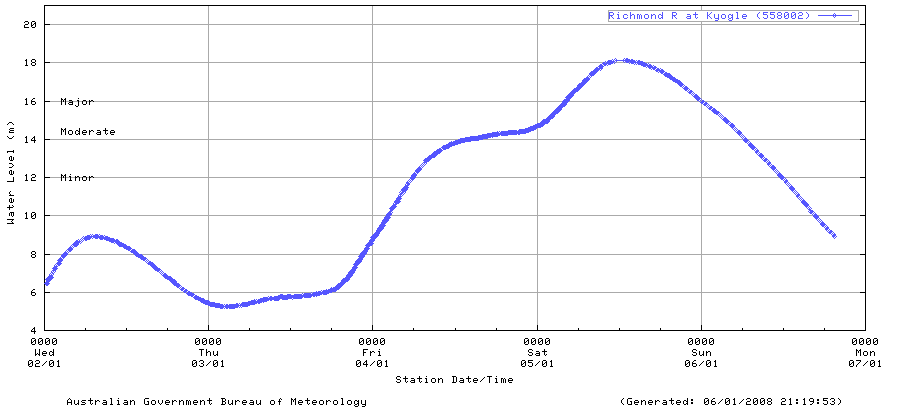
6 January: Flood graphs bring timely upgrade to Bureau Flood Warning service. With flooding occurring in NSW, QLD and the NT for the start of 2008, the Bureau could not have picked a better time to introduce some hugely useful improvements to its flood warning web service. The changes move the service several steps closer to national consistency, with tables and roll-over map information now the same for all states and the NT. Of greatest help are the river height plots, which show graphically the past 4 to 7 days data for each measuring location and are of great practical use during flood times. The flood graphs can be accessed in two ways:
All the rainfall and flood maps and data can be accessed via the Bureau's National Flood Warning Rainfall and River Information interface or this alternative interface on AWN. |